Somewhere in your back catalogue there’s a post, a video or an email that’s still getting clicks today. Traffic you earned months or years ago, still turning up every morning.
The question is where those clicks end up.
If you’ve been promoting affiliate offers for more than a year or two, there’s a good chance some of them land on a 404, an expired sales page, or a polite “this offer is no longer available”. Nothing breaks loudly. Nobody emails you. The visitor shrugs and leaves, and the commission you’d have earned leaves with them.
That’s the real cost of broken affiliate links. Not a crash. A slow, quiet leak.
This post shows you how to find those leaks in about 30 minutes, where to send that traffic instead, and the few habits that stop it happening again.
Why broken affiliate links are so easy to miss
Most of us check a link exactly once: the day we publish. After that, we assume it works.
Meanwhile, the world moves on without asking:
-
- Vendors retire products and don’t tell their affiliates.
-
- Launches close, and the sales page switches to “you missed it”.
-
- Affiliate programmes change platform or link format.
-
- Sites get rebuilt and old URLs quietly die.
Your analytics won’t help much either. They show the visit to your post, and maybe the outbound click. They don’t show the visitor landing on a dead page thirty seconds later.
So the leak sits there, invisible, for as long as nobody goes looking.
The five places lost clicks hide
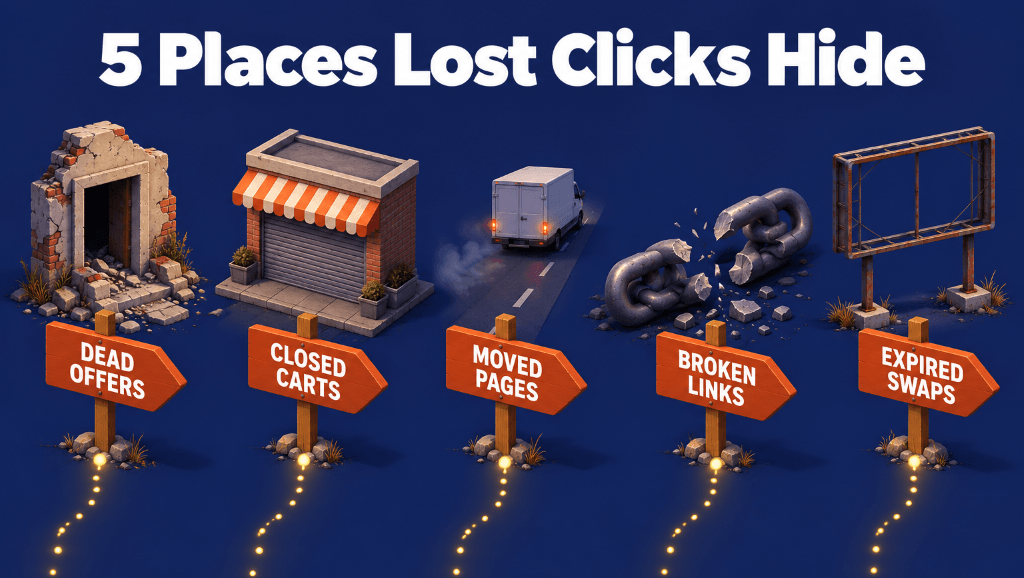
Nearly every leak falls into one of five buckets.
-
- Dead offers. The product was retired or the vendor stopped trading. Common in older review posts and long-running email sequences.
- Closed carts. A launch ended, but your launch emails, social posts and bonus pages still point at the sales page.
- Broken affiliate links. The programme changed its link format, closed, or removed your ID.
- Expired swaps. A sponsor’s slot, a seasonal deal or a limited-time offer ended, and the link was never changed.
Every one of these is a visitor who has already clicked. Getting the click is the hard part. You’ve already done it.
What a leak like this could be worth
Here’s an illustration, not a promise. Swap in your own numbers.
Say you have 20 old pieces of content, each sending just 2 clicks a day to a dead destination. That’s 40 clicks a day, or roughly 1,200 a month, landing on nothing.
Send those 1,200 clicks to an evergreen affiliate offer that converts at 1% with a $20 commission, and that’s about $240 a month. Send them to a $40 product of your own that converts at 2%, and it’s closer to $960 a month. Send them to your opt-in page, and even a modest sign-up rate adds a steady trickle of new subscribers.
Your figures could be higher or lower. The point is that this is money from work you’ve already done, and you won’t know the real number until you measure it.
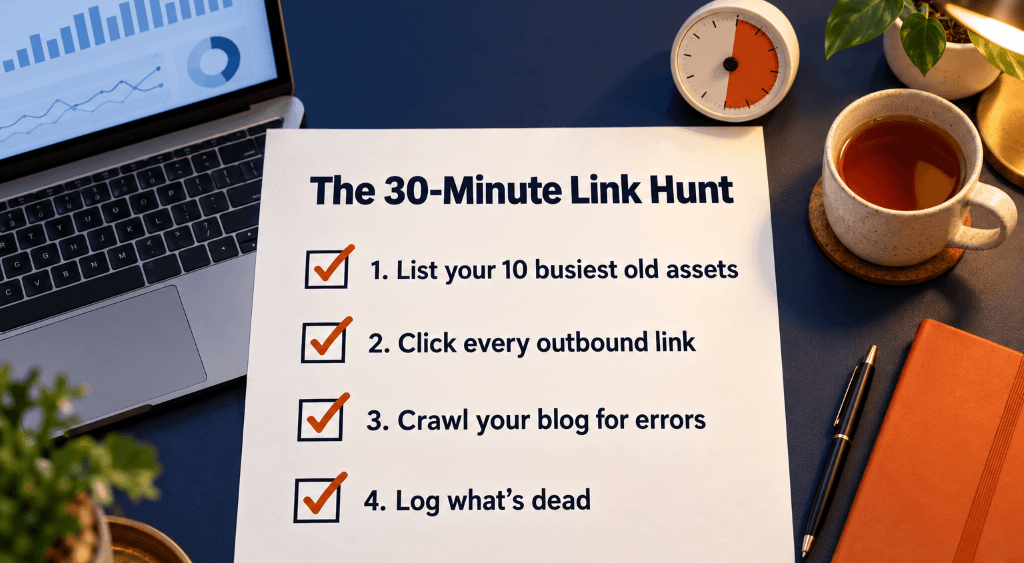
How to find broken affiliate links in 30 minutes
You don’t need to audit every link you’ve ever published. You need to fix the ones people are still clicking. So start where the traffic is, not where the links are.
Step 1: List your ten busiest old assets (10 minutes)
Check your blog analytics for your most-visited posts, YouTube for your most-watched videos, your
autoresponder for the emails that still go out every day, and any free PDF or book that’s still being downloaded. Write down the top ten.
Step 2: Click every outbound link in those ten (10 minutes)
Literally click them. Note anything that lands on a 404, a closed cart, an “offer ended” notice, or a page that no longer matches what your content promises.
Step 3: Run a quick crawl of your blog (5 minutes)
A site crawler, such as the free version of Screaming Frog, will check the status of outbound links across a smaller blog and flag the ones returning errors. It won’t catch a sales page that loads fine but says “sorry, this offer has ended”, which is why Step 2 matters.
Step 4: Log what you find (5 minutes)
Four columns are enough: the asset, the old destination, the new link, and where it now sends people. That log becomes your to-do list, and later your proof of what the clean-up was worth.
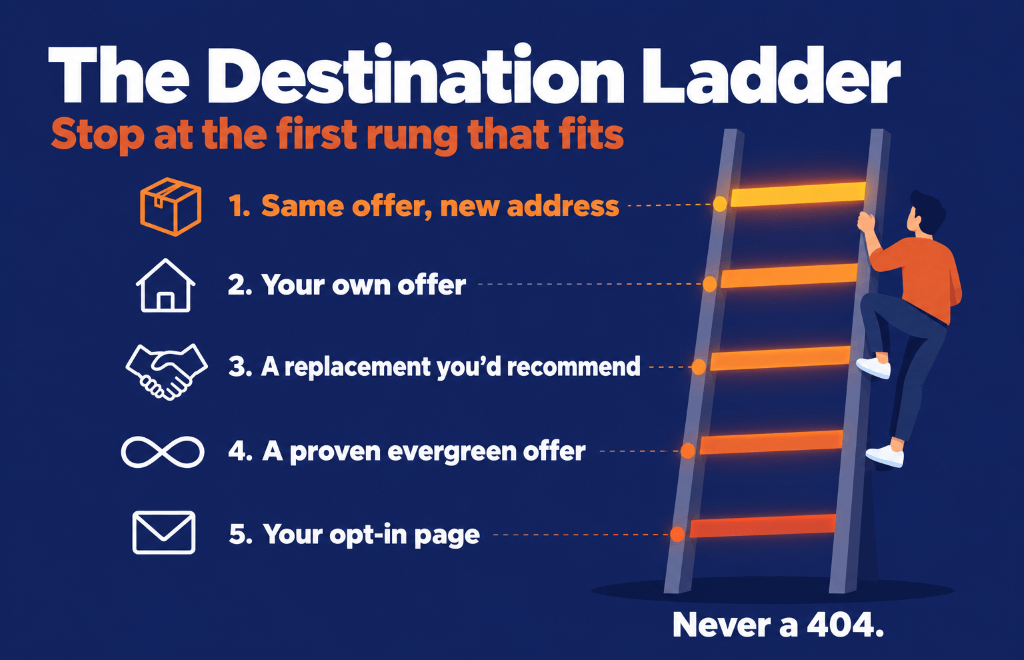
Where to send recovered traffic: the destination ladder
Finding a dead link is half the job. The money is in where you send it next.
Work down this list and stop at the first rung that honestly fits what the visitor was looking for:
-
- The same offer at its new address. If the product still exists and just moved, point the link at its new home. Simplest fix, best match.
- Your own offer. If you sell something that solves the same problem, send them there. You keep the whole sale, and the buyer joins your customer list rather than someone else’s. This is usually the most valuable rung.
- A close replacement you’d genuinely recommend. A current product that does the same job, ideally one you’ve used.
- A proven evergreen affiliate offer. Long-running, broadly relevant, and never closes. Not glamorous, but it turns stray clicks into steady commissions.
- Your opt-in page. If nothing fits, give them a reason to join your list. You won’t earn today, but a dead end has become a subscriber.
One rule overrides everything: relevance beats revenue. Someone who clicked for a keyword tool and lands on a weight-loss offer has just learned to stop clicking your links.
If an old post names a specific product (“click here to grab Product X”), don’t silently redirect it to Product Y. Point the link at a short bridge page instead: “Product X has been retired. Here’s what I use now, and why.” One paragraph, one button. It’s honest, and it converts better than a surprise.
The real fix: stop publishing links you can’t change
Cleaning up is useful. Not needing to clean up is better. These habits make that happen.
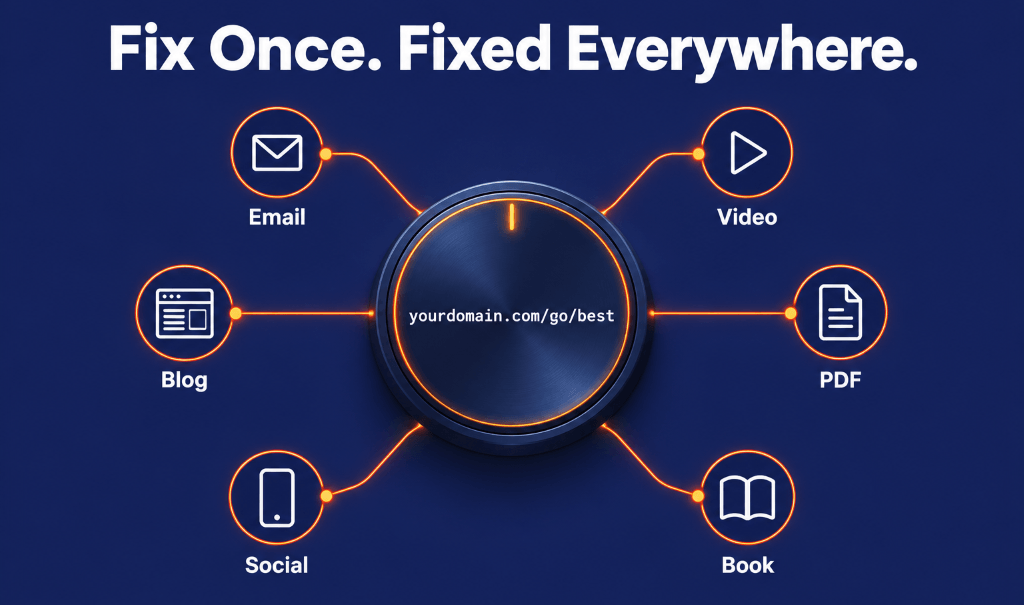
Use managed links on your own domain. Instead of pasting a raw affiliate URL, publish a short redirect link like yourdomain.com/tool. When the destination dies, you change it once in your link manager, and every post, email, video description and PDF using that link follows instantly.
One link per placement. If an offer appears in three emails and a YouTube description, that’s four links pointing at the same place. It’s the only way to see which placement actually did the work.
Create a safety-net link. One evergreen link, such as yourdomain.com/go/best, pointing at your best current recommendation. Whenever something ends and you’re short of time, point the old link there. Nothing you publish should ever finish at a dead page.
Decide the after-destination before the deadline. For any launch or limited offer, write down where the link will go once it ends before you send the first email. When the cart closes, the swap takes ten seconds.
Put managed links inside PDFs and books. A printed or downloaded URL is permanent. The page it points to isn’t. This is the one people forget, and it’s often the oldest traffic you have.
Give it 20 minutes a month. Check for dead links, check anything that ended this month, look at your busiest links, and fix the next batch of old raw ones. That’s the whole maintenance cost.
The tool I’d use for this: Simple Click Tracker Pro
You can do all of the above with spreadsheets and good intentions. A link manager makes it stick, and the one I’d point most affiliates and content creators towards right now is
Simple Click Tracker Pro, from Jen Perdew’s MyNAMS team.
Full disclosure: I’ve been helping the MyNAMS team with this launch, and I earn a commission if you buy through my link. With that on the table, here’s why it fits this job:
-
- Dead-link alerts. It monitors your links and tells you when one stops working, rather than leaving you to find out months later.
-
- Update once, fixed everywhere. Change a destination and every email, post, course module and PDF using that link updates.
-
- Your own domain on every plan, so you aren’t sharing link reputation with spammers on a public shortener.
-
- Unlimited clicks on every plan. You’re never charged more because a promotion did well.
-
- Split testing with an automatic winner, handy when you can’t decide between your own offer and an affiliate one for recovered traffic.
-
- Five rotator types on Growth and above, including timed rotators for sponsor slots and launch switchovers.
-
- No plugin, no server. It’s fully hosted, works on any platform that takes a link, and your links stay live even if your website goes down.
Plans start at $9 a month, there’s a 30-day money-back guarantee, and if you ever cancel, your existing redirects keep working for 60 days so nothing you’ve published breaks overnight.
Launch pricing: until 13 October, every plan comes with increased link and custom-domain limits at the same monthly price.
If you get it through my link, I’ll also give you my bonus,
The Found Money Link Playbook: the full 30-minute hunt, the destination ladder, three bridge-page formats, the safety-net setup, twelve link best practices and the monthly routine, all written specifically for SCT Pro.
Frequently asked questions
What is a broken affiliate link?
Any affiliate link that no longer gets the visitor to a page where they can buy. That includes 404 errors, but also expired sales pages, closed launch pages and links where your affiliate ID no longer tracks.
Do broken outbound links hurt SEO?
A few broken outbound links are unlikely to sink your rankings on their own. They do make content look neglected and give readers a poor experience. For most affiliates, the bigger cost is the lost revenue, not the ranking.
How often should I check my affiliate links?
A quick monthly check catches most problems. Check launch and time-limited links on the day they end, evergreen links every three months, and links in books or printed material every six months.
Can I redirect a dead affiliate link to a different product?
Yes, provided the new destination is genuinely relevant and you’re honest about the change. If the original content names a specific product, use a short bridge page rather than a silent redirect, and check the terms of any affiliate programme you send traffic to.
Do I need WordPress to manage my links?
No. Hosted link managers like Simple Click Tracker Pro work on any platform where you can paste a link, including Kajabi, Systeme.io, email platforms, YouTube and PDFs.
The bottom line
Your old content is still working. The only question is whether its clicks land somewhere useful.
Spend 30 minutes this week finding your five biggest leaks. Send that traffic to your own offer, a proven evergreen offer or your list. Then switch to managed links so you never have to hunt for them again.
If you’d like the full playbook and a tool built for the job,
get Simple Click Tracker Pro and my Found Money bonus here.
Disclosure: this post contains affiliate links. If you buy through them I may earn a commission, at no extra cost to you.
READ LATER - DOWNLOAD THIS POST AS PDF >> CLICK HERE <<