
Ask most people where they’d go for free traffic and they’ll say TikTok, Instagram or Facebook.
Ask the people quietly making money with Amazon affiliate links and a surprising number of them will say Pinterest.
There’s a simple reason. On most social platforms people are passing time. On Pinterest they’re planning: a kitchen makeover, a garden, a wedding, Christmas presents. And when people plan, they buy. Pinterest’s own holiday marketing guide says 41% of its users start building gift lists as early as October.
This guide covers Amazon affiliate marketing on Pinterest from the ground up: why it works, how to pick what to promote, when to publish, how to structure your links so you stay compliant, and how to turn one-off clicks into an audience you own. At the end I’ll look at a new tool that takes most of the grunt work out of it.
Why Pinterest Works So Well For Amazon Affiliates
Pinterest behaves much more like a search engine with pictures than a social network. People type in what they want (“small bathroom storage ideas”, “gifts for dad who has everything”) and Pinterest shows them pins that match.
That has three big advantages for an affiliate:
- Intent. Someone searching “gifts for coffee lovers under $50” has already decided to spend money. You’re helping them decide where.
- Longevity. A good pin can keep being found for weeks or months. A social post is usually gone within a day.
- No audience needed to start. Because people find pins through search, a brand-new account can get traffic without thousands of followers first.
Amazon is the natural partner. It sells almost everything, people trust it, and its 24-hour window means you can earn on other things a visitor buys after clicking your link, not just the product you recommended.
Step 1: Pick Niches That Suit Pinterest
Not every product works on Pinterest. The ones that do tend to share a few traits. Run any idea through these five questions:
| Test | Question |
|---|---|
| Visual | Does the result look good in a photo? |
| Planning | Do people research before buying it? |
| Lifestyle | Is it part of a home, hobby, event or identity? |
| Range | Are there lots of related products to promote? |
| Seasonality | Does it peak at predictable times of year? |
Home and interiors, kitchen and cooking, gifts, seasonal decor, self-care, baby and kids, crafts, gardening, pets and home-office set-ups all score well. Car parts and printer ink mostly don’t.
The single most useful mindset shift: sell the picture of the result, not the product. “A calm, tidy kitchen” sells drawer organisers. “Cosy autumn evenings” sells throws, candles and slippers.
Start with three niches: one you understand, one with a seasonal peak coming up, and one evergreen niche such as kitchen organisation that earns all year.
Step 2: Publish Ahead Of The Search
This is where most beginners go wrong. A new pin doesn’t get its full reach on day one. Pinterest needs time to crawl it, work out what it’s about and test it with users. For a new account that can take a couple of weeks.
So the rule is simple: publish ahead of the search, not on the day of it.

| When people search | When your pins should be live |
|---|---|
| Black Friday and Cyber Monday | Early to mid November |
| Christmas gifts | Late October through November |
| Last-minute gifts and stocking fillers | Late November to early December |
| New Year organising and fitness | Mid to late December |
| Spring garden and home refresh | February |
Think a month or more ahead of real life. When it’s October outside, your Pinterest account should be thinking about December.
Step 3: Build Campaigns, Not Single Pins
One product can carry several different angles, and each angle reaches a different search. A cosy throw blanket can be:
- a gift for her
- a gift under $40
- a self-care idea
- a new-homeowner gift
- part of a “cosy living room” list
That’s five campaigns from one product. Each needs its own pin images, headline, description and keywords. Pinterest favours fresh images, so new visuals for each angle beat re-pinning the same picture.
A few headline rules that consistently help:
- Lead with the recipient or occasion: “Gifts for Gardeners” beats “Amazing Garden Kneeler”.
- Use numbers for list-style pins: “21 Cosy Gifts Under $30”.
- Keep text on the image short, around five to eight words.
- Only add urgency when it’s true.
Step 4: Send Traffic To A Content Page, Not Straight To Amazon
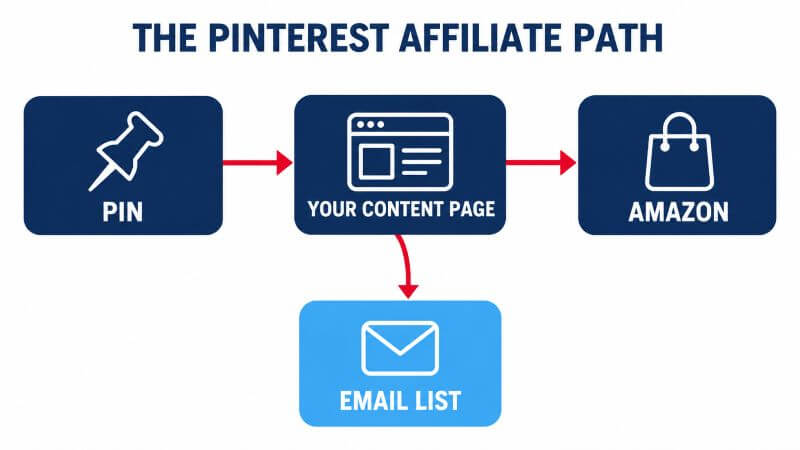
You can put affiliate links directly on pins, but the stronger structure is: pin, then your own content page, then a clearly labelled Amazon link.

A content page such as “15 Gifts Every Coffee Lover Wants” does several jobs at once:
- It matches how people browse on Pinterest, so it usually gets more clicks than a single product.
- It gives the visitor more than one thing to click while they’re in buying mode.
- It’s where your disclosures live.
- It’s where you can add an email opt-in (more on that below).
- It lets you mix in products from other affiliate programmes.

Step 5: Stay On The Right Side Of The Rules
Most people who lose their Amazon Associates account didn’t do anything dodgy. They just didn’t know a rule existed. The big ones for Pinterest:
- Disclose twice. Amazon requires its own statement (“As an Amazon Associate I earn from qualifying purchases”) wherever you use its links. Separately, advertising rules require a clear label such as #ad on affiliate content.
- Make your first sales. New Associates accounts are closed if they don’t make three qualifying sales within 180 days, so get your Pinterest traffic building before you apply.
- Don’t hide the destination. Shorteners or redirects that make it unclear a link goes to Amazon are against the rules.
- Don’t copy Amazon’s images or prices. Use original pin images, and only show prices that come from Amazon’s own tools.
- No Amazon links in PDFs or ebooks, including your free downloads.
- Don’t spam Pinterest. Around three to five pins a day, spread out, with fresh images, is a sensible pace.
Rules change and vary by country, so read Amazon’s current Associates Program Policies for your marketplace before you start.
Step 6: Turn Clicks Into A List You Own
Every Pinterest click is borrowed. If your reach drops, the traffic stops. The fix is to turn some visitors into email subscribers.
Add a small, relevant freebie to each content page: a printable Christmas gift planner, a kitchen organisation checklist, a new-puppy shopping list. Offer it partway down the page and at the end. Then send a short welcome sequence, followed by a weekly “5 finds” email that links back to your content pages.
One important detail: keep Amazon links out of your emails and freebies. Link to your own pages instead, and let those pages link to Amazon. It keeps you compliant and gives you more control.
The Problem: This Is A Lot Of Work Per Campaign
If you’ve read this far, you’ll have noticed the catch. Done properly, every campaign means researching the product, finding the angles, designing several pin images, writing headlines, descriptions and keywords, building a content page, and scheduling it all sensibly.
Done by hand, that’s easily an afternoon per product. Multiply it by the twenty or thirty campaigns you’d want live for Christmas and it’s easy to see why most people give up after their third pin.
Pin2Profit AI: What It Does
Pin2Profit AI is a new cloud-based tool from Demetris that tackles exactly that workload. You paste an Amazon product link (or grab it with the Chrome extension), click once, and it builds the campaign:
- analyses the product from an affiliate’s point of view
- plans several angles from one product: gift, problem/solution, lifestyle, list-style, seasonal and comparison
- generates pin images in multiple styles, and actual video pins rather than storyboards
- writes headlines, descriptions, calls to action and keywords
- builds an affiliate content page, including list-style pages
- schedules pins at 3 to 5 a day and exports a Pinterest-ready CSV for bulk upload
- connects to Pinterest directly and imports your analytics, so you can see which pins earn
It also includes Pinterest’s 2026 trend predictions, so you can plan around what’s about to rise. Free image generation is included; for video and some advanced features you bring your own AI keys.
The front end is $27 at launch and includes one Pinterest account and one affiliate page. There are optional upgrades for more accounts, unlimited pages, trend tools, done-for-you templates, Pinterest ads and agency use, but you don’t need them to start.
My Verdict
Pin2Profit AI doesn’t change what works on Pinterest. You still need sensible niches, good timing and pins that match real searches, and new pins still take time to be found. No tool removes that.
What it changes is the cost of doing it properly. The structure in this guide (several angles per product, fresh images, a content page, sensible scheduling) is exactly what Pin2Profit is built around, and it turns an afternoon of work into a few clicks. If the workload has been what’s kept you off Pinterest, that’s the bit worth paying attention to.
Bring a little judgement to it: review what the AI writes before it goes out, keep your disclosures in place, and don’t upload copied Amazon product photos for editing. Use the original images it generates instead.
My Bonuses If You Pick It Up
If you buy Pin2Profit AI through my link, I’ll send you five reports that cover the parts the software can’t decide for you:
- The Q4 Gift-Season Pinterest Sprint: a 30-day plan for Black Friday and Christmas
- 50 Pinterest-Friendly Amazon Niches: peak months, board names and angles for each
- Pin to List: turning Pinterest clicks into email subscribers
- Amazon Associates on Pinterest: Don’t Get Banned: the rules, with a pre-publish checklist
- Beyond Amazon: 20+ affiliate programmes that work on Pinterest
See Pin2Profit AI and my five bonuses here ?
Frequently Asked Questions
Can you use Amazon affiliate links on Pinterest?
Yes. Pinterest allows affiliate links, and Amazon allows Pinterest as a promotion channel, provided you follow both sets of rules: clear disclosure, no misleading links, and Amazon’s rules on images and prices. List your Pinterest account in your Amazon Associates settings too.
Do I need a website for Pinterest affiliate marketing?
Not strictly, but a content page between the pin and Amazon is the stronger structure. It’s where your disclosures, list-style recommendations and email opt-in live. Tools like Pin2Profit AI build those pages for you.
How many pins should I post a day?
Around three to five a day is a sensible pace, especially for a new account. Spread pins for the same product over several days, and use fresh images rather than re-pinning the same one.
How long does Pinterest take to send traffic?
It varies. New accounts can take a few weeks to build momentum, which is why publishing ahead of seasonal searches matters so much.
Disclosure: this post contains affiliate links. If you buy through one of them I earn a commission at no extra cost to you.

