Most book promotion on social media looks the same. A cover, a link and a line that says “my new book is out”.
It rarely works, and it isn’t hard to see why. Nobody stops scrolling for an advert, and that’s exactly what it looks like.
Yet a book is full of the things that do stop people scrolling: characters, conflict, surprises, funny lines and ideas that make you think “huh, I never looked at it like that”. The trick is to stop promoting the book as a single product and start treating it as a library of short moments, each of which can become a video.
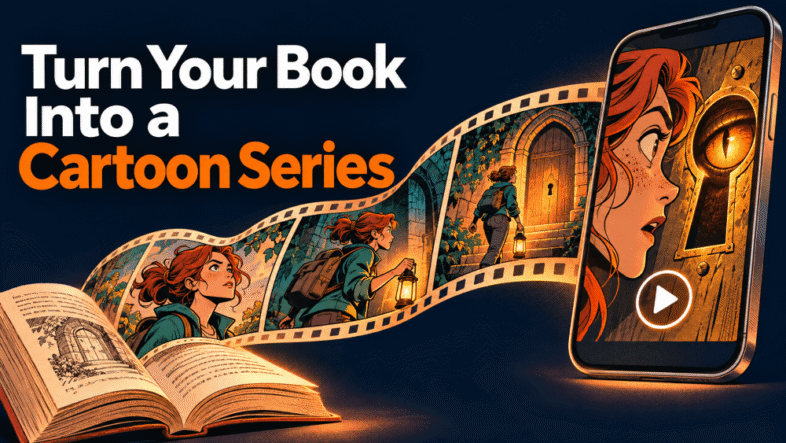
This guide shows you how to promote your book with video, using short cartoon episodes in particular. It covers picking the right scenes, structuring each episode so it sends people back to the book, where to send viewers, how to post consistently, and the rules you need to know when you use AI tools to do it.
Why Short Video Works for Books
Short-form video, whether that’s YouTube Shorts, TikTok, Instagram Reels or video on Facebook and LinkedIn, rewards content that hooks people fast and makes them want more. Books are unusually well suited to that, for three reasons.
- You already have the scripts. Every scene and every lesson is written. You’re choosing content, not inventing it.
- Characters build habits. People follow characters. A recurring cast gives viewers a reason to come back for the next episode, and the book is where the full story lives.
- Books create open loops. A scene that ends just before the answer is a natural call to action. “What happens next is in chapter 3” beats “buy my book” every time.
It isn’t just fiction. A non-fiction book is a stack of single ideas, and each one can be acted out in 30 seconds: a mistake and its fix, a myth and the truth, a before and after.
Why Cartoons in Particular?
Live-action book trailers need actors, locations and editing. Talking-head videos need you on camera every day, which many authors would rather avoid.
Animation sidesteps both. A cartoon can show a dragon, a dungeon or a talking mushroom as easily as a kitchen table. It can exaggerate a mistake for comic effect without looking fake. And with a consistent cast, it builds a recognisable series that feels like entertainment rather than promotion.
The historical problem was cost. Animation meant hiring an animator and voice actors. AI tools have changed that, which is why this approach is suddenly realistic for an individual author.
Step 1: Break Your Book Into Chunks
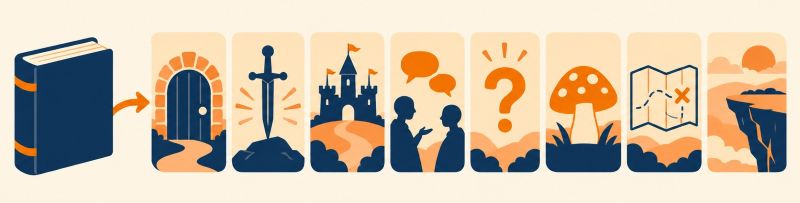
A “chunk” is a piece of your book that makes sense in under a minute to someone who has never heard of you. Go through the book chapter by chapter and list every moment or idea that could stand alone. Don’t judge yet.
For fiction, the strongest chunks tend to be:
- The cold open: drop the viewer straight into the first big moment.
- The character intro: one character, one defining moment.
- The cliffhanger: stop just before the answer.
- The banter: a short, funny exchange that shows your tone.
- The world rule: how the magic, technology or setting works. Genre readers love this.
- The dilemma: a choice a character faces, posed to the viewer as a question.
For non-fiction:
- One lesson: a single idea from one chapter, acted out.
- Myth vs truth: one character believes the myth, another shows what really happens.
- The mistake: a character makes the classic error your book fixes.
- The analogy: your best metaphor, made visual.
- The quick win: something viewers can do today.
A typical novel will give you 60 or more candidates. A ten-chapter non-fiction book will easily give you 30.

Step 2: Pick the Winners
Not every moment makes a good video. Score each candidate on five quick questions:
- Does it make sense with no context?
- Is there a hook in the first two or three seconds?
- Is it visual, rather than a character thinking?
- Is it spoiler-safe?
- Does it open a loop that only the book closes?
Keep the ones that score well on most of them. For fiction, take most of your chunks from the first third of the book. Give away the setup, the characters and the tone. Never give away the twist or the ending.
Step 3: Structure Every Episode the Same Way
Every episode, whatever it’s about, can follow a simple three-part spine:
- The moment: a recognisable situation or a dramatic opening, within the first two seconds.
- The turn: something changes, whether it’s a discovery, a mistake or a reveal.
- The bridge: one line, spoken or captioned, that points back to the book.
The bridge is what turns entertainment into traffic. Some examples:
- “What she found in the cellar is in chapter 3.”
- “That’s habit one. The other nine are in the book.”
- “The next scene is free at the link in my profile.”
Without a bridge, you’ve made a nice cartoon. With one, you’ve made a trailer.
Step 4: Build a Cast That Stays Consistent
Consistency is what turns a handful of videos into a series. Decide on your three to five recurring characters before episode one, and keep their look, voice and personality the same every time. Viewers notice when a character’s voice changes, and it breaks the spell.
For non-fiction, you still need characters. A “learner” and a “mentor” is enough, or cartoonise yourself as the mentor.
Step 5: Decide Where Viewers Go Next
This is the step most authors skip, and it’s the one that decides whether the videos sell anything.
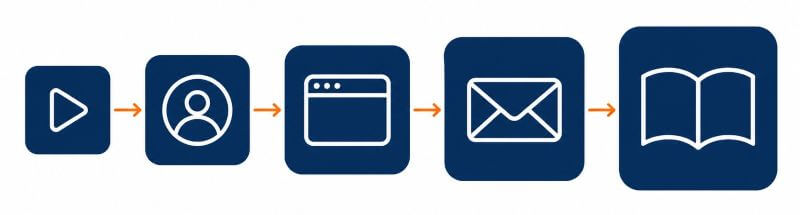
A viewer who has watched one 30-second episode is rarely ready to buy. But they might be ready to take something free. So instead of sending every click straight to a store, consider a simple landing page that offers a reader magnet: the next scene, a bonus short story, the character files or, for non-fiction, a checklist or worksheet. Put a “buy the book” link underneath for the people who are ready.
People who join your list get a short welcome sequence: deliver the freebie, tell them why you wrote the book, then make a clear offer. That’s where most of the selling happens. The videos just open the door.

Don’t forget your profile bio, which sits between the video and the link. Make it say what the channel is and why to tap the link: “Cartoon episodes from my fantasy series. Free bonus chapter at the link.” beats “Author. Dreamer. Coffee lover.”
Step 6: Post Consistently, Not Constantly
You don’t need a new video every day. A sensible plan is around a dozen episodes a month, with each one used several ways:
- the episode itself in vertical format for Shorts, Reels and TikTok
- a square or widescreen version for Facebook, LinkedIn or YouTube, if it’s worth the extra effort
- a still frame with a caption or a quote from the book
- a short “how I made this” post
- a mention in your weekly email
Once a week, check which episodes got the most link clicks and sign-ups, not just views, and make more of that type.
The Rules You Need to Know
AI tools make it easy to publish quickly, so it’s worth knowing where the lines are. Platform rules change, so check the current help pages.
- AI labels: YouTube requires disclosure of realistic altered or synthetic content, and says clearly unrealistic content such as animation doesn’t need it. TikTok and Meta require labels for realistic AI content. If you add a realistic voice or a real person’s likeness, disclose it. On TikTok, turning the AI-generated label on for AI cartoons is the sensible default.
- Made for Kids: on YouTube, every video has to be marked as made for kids or not. Cartoons aren’t automatically kids’ content, but if children are an intended audience, it’s your responsibility to set it correctly.
- Mass-produced content: YouTube’s monetisation policies target mass-produced and repetitive content. A book helps here, because each chunk is genuinely different.
- Rights: animate your own work. If you’re traditionally published, check whether your publisher holds animation or audiovisual rights. Don’t borrow famous characters.
- Ad labels: if you earn from a link, label it clearly. In the UK, the ASA’s guidance points to an upfront “#ad”.
RocketToons AI: What It Does
One of the newer tools built for this kind of content is RocketToons AI, a browser-based AI cartoon studio. You type a one-line idea or paste a script, and it writes a screenplay with scenes and dialogue. You approve a storyboard of stills before anything animates, then it produces a voiced, scored episode with lip-sync and captions.
The features that matter most for book promotion:
- a cast library and character lock, so the same characters appear episode after episode, plus cartoonising from a single photo
- 40 voices auto-cast by age and gender, and 54 languages for voices and subtitles
- 8 animation styles, and 16:9, 9:16 and 1:1 formats
- HD MP4 export with no watermark, or posting straight to YouTube, Instagram, Facebook and LinkedIn
- a commercial licence included, so you can make videos for clients as well
It runs on credits. The front-end Commercial plan is a one-time payment with 1,000 credits, which the vendor describes as around 50 short videos, with longer videos using more. There are optional upgrades, including more credits and longer clips.
My Verdict
I’ll be straight: I’m getting set up to use RocketToons on my own GameLit series, so I don’t have results to share yet. What I can say is that the idea behind it matches the approach in this guide very well. The storyboard approval step is genuinely useful, because it lets you fix a scene before you spend credits animating it, and consistent characters are exactly what a book series needs.
The limitation is the credit budget. Around 50 short videos is plenty if you choose your chunks carefully and not much if you don’t, so plan your first 10 to 15 episodes, see which ones send clicks, then spend the rest on more of the same. The vendor’s own marketing leans on huge view counts from kids’ channels like Cocomelon. Those are other companies’ numbers, not a forecast, and I’d ignore them.
If making video has been the thing stopping you from promoting your book, this takes away most of the cost and skill. The thinking (what to animate, where to send viewers) is still your job, and that’s where the bonuses below come in.
My Bonuses If You Pick It Up
If you buy RocketToons AI through my link, I’ll send you five reports that cover the parts the software can’t decide for you:
- The Book-to-Toons Chunking Kit: 16 chunk types, a scorecard, idea formulas and a 30-episode book map
- The Eyeballs-to-Buyers Funnel Map: bio, landing page, reader magnets and a 3-email welcome sequence
- The 30-Day Toon Traffic Calendar: a day-by-day posting plan and 15 hook formulas
- The AI Video Disclosure & Rights Cheat Sheet: AI labels, Made for Kids, public domain and ad labels
- Toons for Any Offer: ten story-led script frameworks for books, courses, local businesses and affiliate products
See RocketToons AI and my five bonuses here ?
Frequently Asked Questions
Do book trailers actually sell books?
A single trailer rarely moves the needle on its own. A series of short episodes, each ending with a reason to read on and paired with a free reader magnet and an email list, gives you many chances to reach the right reader, and a way to stay in touch with them.
Is it OK to use AI to animate my own book?
Yes, if you hold the rights. Self-published authors usually do. Traditionally published authors should check their contract, because animation or audiovisual rights are sometimes held by the publisher.
Do I need to label AI cartoons on YouTube?
YouTube’s disclosure requirement is aimed at realistic content that viewers could mistake for real, and it gives animation as an example of content that doesn’t need disclosing. If you add realistic elements, such as a real person’s likeness or voice, you should disclose it. Disclosing doesn’t affect reach or monetisation, according to YouTube.
Will this work for non-fiction?
Very well. Each lesson, myth, mistake or quick win in your book can be its own episode, and a “mentor and learner” pair of characters makes it easy to act them out.
Can I use the same approach for other offers?
Yes. A course has modules, a service has client stories and an affiliate product solves a problem that can be acted out. The chunk, hook and bridge structure works the same way.
Disclosure: this post contains affiliate links. If you buy through them I may earn a commission at no extra cost to you.